TCP
TCP (Transmission Control Protocol) is a fundamental networking standard that ensures reliable, ordered, and error-free delivery of data between applications over an IP network. It operates at the Transport Layer of the OSI model and forms the backbone of internet communication alongside IP (as TCP/IP).
| Advantages of TCP | Disadvantages of TCP |
|---|---|
| Guarantees the accuracy of data. | Requires a reliable connection between the two devices. If one small chunk of data is not received, then the entire chunk of data cannot be used. |
| Capable of synchronising two devices to prevent each other from being flooded with data. | A slow connection can bottleneck another device as the connection will be reserved on the receiving computer the whole time. |
| Performs a lot more processes for reliability. | TCP is significantly slower than UDP because more work has to be done by the devices using this protocol. |
TCP Packet#
TCP packets contain various sections of information known as headers that are added from encapsulation.
| Header | Description |
|---|---|
| Source Port | This value is the port opened by the sender to send the TCP packet from. This value is chosen randomly (out of the ports from 0-65535 that aren’t already in use at the time). |
| Destination Port | This value is the port number that an application or service is running on the remote host (the one receiving data); for example, a webserver running on port 80. Unlike the source port, this value is not chosen at random. |
| Source IP | This is the IP address of the device that is sending the packet. |
| Destination IP | This is the IP address of the device that the packet is destined for. |
| Sequence Number | When a connection occurs, the first piece of data transmitted is given a random number. We’ll explain this more in-depth further on. |
| Acknowledgement Number | After a piece of data has been given a sequence number, the number for the next piece of data will have the sequence number + 1. We’ll also explain this more in-depth further on. |
| Checksum | This value is what gives TCP integrity. A mathematical calculation is made where the output is remembered. When the receiving device performs the mathematical calculation, the data must be corrupt if the output is different from what was sent. |
| Data | This header is where the data, i.e. bytes of a file that is being transmitted, is stored. |
| Flag | This header determines how the packet should be handled by either device during the handshake process. Specific flags will determine specific behaviours, which is what we’ll come on to explain below. |
Three-way handshake#
This is the process used to establish a connection between two devices.
Establishing a Connection#
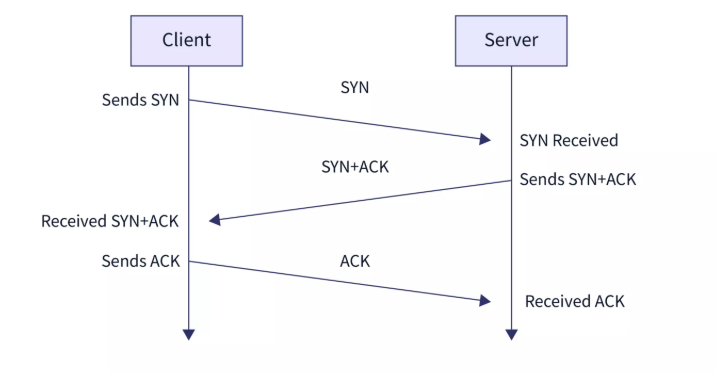
The Three-way handshake communicates using a few special messages - the table below highlights the main ones:
| Step | Message | Description |
|---|---|---|
| 1 | SYN | A SYN message is the initial packet sent by a client during the handshake. This packet is used to initiate a connection and synchronise the two devices together (we’ll explain this further later on). |
| 2 | SYN/ACK | This packet is sent by the receiving device (server) to acknowledge the synchronisation attempt from the client. |
| 3 | ACK | The acknowledgement packet can be used by either the client or server to acknowledge that a series of messages/packets have been successfully received. |
| 4 | DATA | Once a connection has been established, data (such as bytes of a file) is sent via the “DATA” message. |
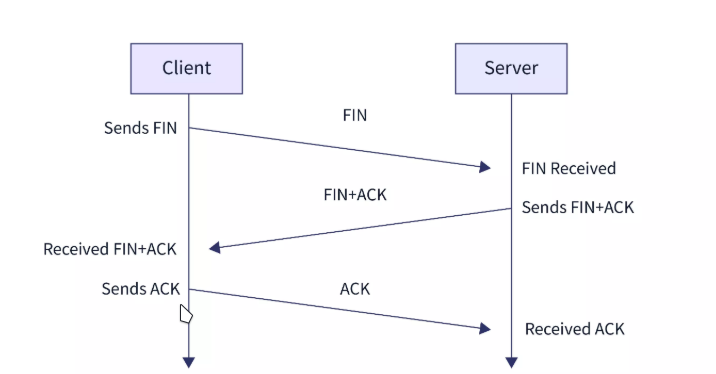
| 5 | FIN | This packet is used to cleanly (properly) close the connection after it has been complete. |
| # | RST | This packet abruptly ends all communication. This is the last resort and indicates there was some problem during the process. For example, if the service or application is not working correctly, or the system has faults such as low resources. |
Any sent data is given a random number sequence and is reconstructed using this number sequence and incrementing by 1. Both computers must agree on the same number sequence for data to be sent in the correct order. This order is agreed upon during three steps:
- SYN - Client: Here’s my Initial Sequence Number(ISN) to SYNchronise with (0)
- SYN/ACK - Server: Here’s my Initial Sequence Number (ISN) to SYNchronise with (5,000), and I ACKnowledge your initial number sequence (0)
- ACK - Client: I ACKnowledge your Initial Sequence Number (ISN) of (5,000), here is some data that is my ISN+1 (0 + 1)
Closing a Connection#
TCP will close a connection once a device has determined that the other device has successfully received all of the data.