SSL and TLS
SSL (Secure Sockets Layer) and TLS (Transport Layer Security) are cryptographic protocols designed to provide secure communication over a computer network.
When you see the padlock icon in your browser address bar (HTTPS), or when you connect securely to an IMAP, POP3, or SMTP mail server, SSL/TLS is working under the hood. It ensures three fundamental security properties:
- Encryption: Hiding data from eavesdroppers.
- Authentication: Verifying that the identity of the server (and optionally the client) is legitimate via digital certificates.
- Integrity: Ensuring the data hasn’t been altered or corrupted in transit.
Timeline#
- In the early 1990s, Netscape Communications recognised the need for secure communication on the World Wide Web. They eventually developed SSL (Secure Sockets Layer) and released SSL 2.0 in 1995 as the first public version. It is deprecated due to severe cryptographic flaws (like the POODLE attack).
- In 1999, the Internet Engineering Task Force (IETF) developed TLS (Transport Layer Security). Although very similar, TLS 1.0 was an upgrade to SSL 3.0 and offered various improved security measures. TLS 1.0 & 1.1 was Released by the IETF to genericize the protocol. Both are officially deprecated because they rely on weak hashing and cipher algorithms (like MD5 and SHA-1).
- TLS 1.2 was released in 2008. It added support for authenticated encryption (AEAD ciphers like AES-GCM) and remains widely used across the internet.
- In 2018, TLS had a significant overhaul of its protocol and TLS 1.3 was released. It dramatically streamlined the handshake process, dropped legacy algorithms, and enforced Perfect Forward Secrecy (PFS) by default.
Nowadays, tens of protocols have received security upgrades with the simple addition of TLS. Examples include HTTP, DNS, MQTT, and SIP, which have become HTTPS, DoT (DNS over TLS), MQTTS, and SIPS, where the appended “S” stands for Secure due to the use of SSL/TLS.
The Core Cryptographic Concept#
SSL/TLS relies on a hybrid cryptographic system:
- Asymmetric Cryptography (Public/Private Key): Used during the initial handshake to authenticate the server and securely exchange a shared secret key. Algorithms include RSA or Diffie-Hellman variants.
- Symmetric Cryptography (Shared Secret Key): Once the handshake is complete, both sides switch to a symmetric algorithm (like AES or ChaCha20) to encrypt the actual payload data. This is done because symmetric encryption is orders of magnitude faster than asymmetric cryptography.
The TLS 1.3 Handshake#
One of the biggest upgrades in TLS 1.3 over TLS 1.2 is efficiency. While TLS 1.2 required two complete network round-trips (2RTT) to establish a secure connection, TLS 1.3 cuts it down to a single round-trip (1RTT).
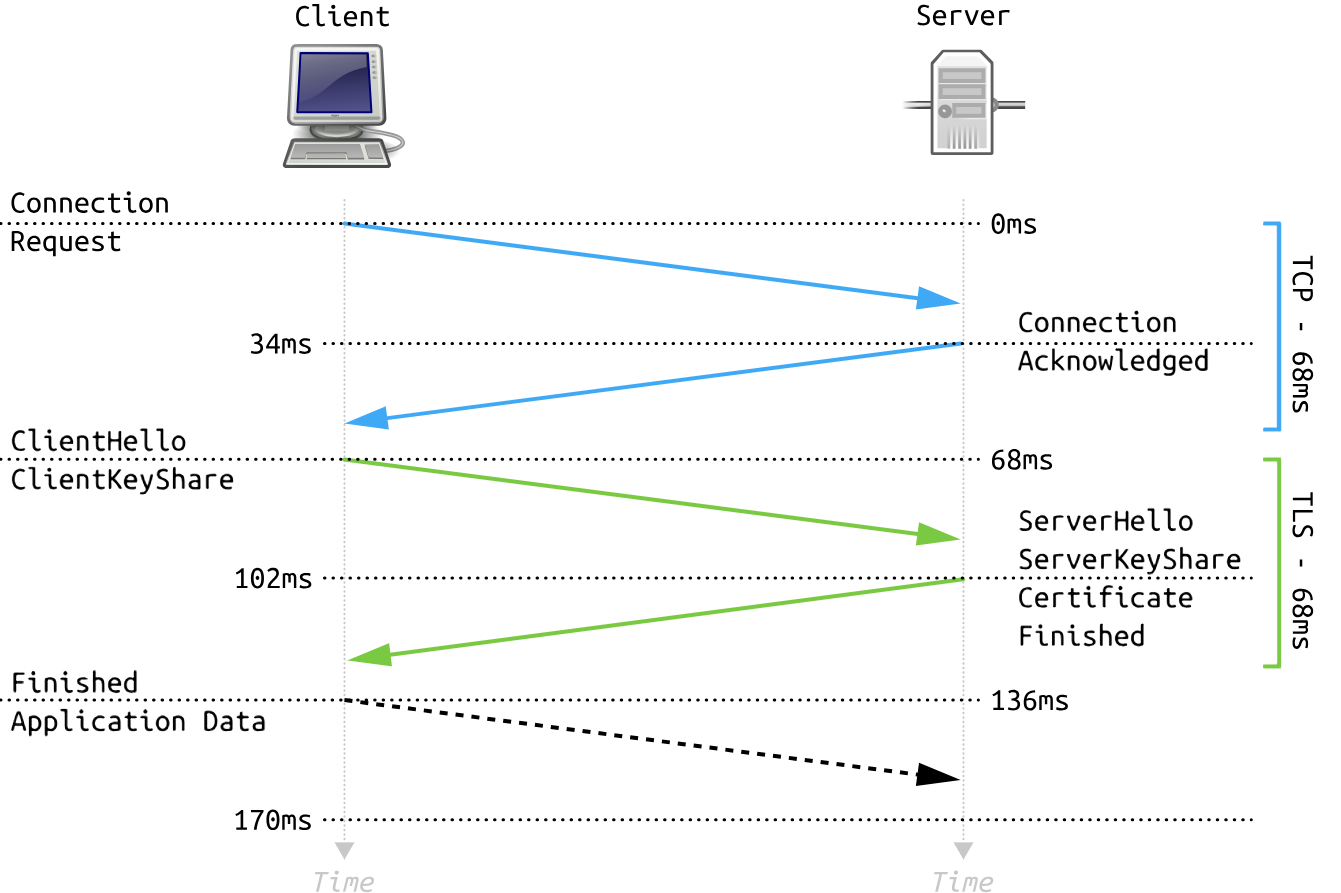
- ClientHello + ClientKeyShare: The client sends a list of supported cipher suites and proactively guesses the server’s key exchange algorithm, sending its cryptographic key share right away.
- ServerHello + ServerKeyShare: The server chooses the cipher suite, responds with its own key share, and instantly calculates the shared session keys.
- Certificate + Finished: In the same response flight, the server sends its digital certificate (encrypted) and a “Finished” tag.
- Application Data: The client verifies the certificate, calculates the session keys, and immediately begins passing encrypted app traffic.
If a client has connected to the server before, TLS 1.3 can use a feature called 0-RTT (Zero Round-Trip Time Resumption), allowing encrypted application data to be sent inside the very first packet.
TLS Cipher Suites Explained#
A cipher suite is a combination of cryptographic algorithms used to secure a connection. In TLS 1.2, they looked incredibly messy, but TLS 1.3 narrowed the options to just a few rock-solid combinations.
A typical TLS 1.3 cipher suite looks like this: TLS_AES_256_GCM_SHA384
Breaking this down into its individual components:
- TLS: The protocol being used.
- AES_256_GCM: The symmetric cipher used for data encryption, operating in Galois/Counter Mode (GCM) with a 256-bit key size. GCM provides both confidentiality and built-in tamper checking.
- SHA384: The Secure Hash Algorithm, used to generate cryptographic checksums for data integrity verification and digital signatures.
How TLS is set up and used#
The first step for every server (or client) that needs to identify itself is to get a signed TLS certificate. Generally, the server administrator creates a Certificate Signing Request (CSR) and submits it to a Certificate Authority (CA); the CA verifies the CSR and issues a digital certificate. Once the (signed) certificate is received, it can be used to identify the server (or the client) to others, who can confirm the validity of the signature. For a host to confirm the validity of a signed certificate, the certificates of the signing authorities need to be installed on the host.
Generally speaking, getting a certificate signed requires paying an annual fee. However, Let’s Encrypt ↗ allows you to get your certificate signed for free.
Some users also opt to create a self-signed certificate. A self-signed certificate cannot prove the server’s authenticity as no third party has confirmed it.
We can set the browser to log the session’s TLS keys so we can take a closer look at the traffic using Wireshark.
- By adding an extra option to the browser shortcut. Executing
chromium --ssl-key-log-file=~/ssl-key.logdumps the TLS keys to thessl-key.logfile.- Or we can set an env variable SSLKEYLOGFILE. such as
export SSLKEYLOGFILE="$HOME/ssl-key.log"
To configure Wireshark to use the ssl-key.log file so that all the TLS traffic gets decrypted:
- First, after right-clicking any TLS packet, choose “Protocol Preferences.”
- From the submenu, select “Transport Layer Security.”
- Thirdly, click on “Open Transport Layer Security preferences.”
- Clicking “Open Transport Layer Security preferences” will show a dialog box. You must click the “Browse” button next to (Pre)-Master-Secret log filename
and select thessl-key.logfile