FTP
FTP (File Transfer Protocol) is a standard network protocol used to transfer computer files between one host to another.
- File Transfer Protocol (FTP) is designed to transfer files. As a result, FTP is very efficient for file transfer, and when all conditions are equal, it can achieve higher speeds than HTTP.
- It operates on a client-server model where you upload (send) or download (receive) files by authenticating with a server using a username and password though some servers allow anonymous access.
- Modern alternatives like SFTP or FTPS are generally recommended today because traditional FTP transmits data in plain text, making it vulnerable to interception.
- Wikipedia: https://en.wikipedia.org/wiki/File_Transfer_Protocol ↗
Usage#
ftp [ip]Architecture#
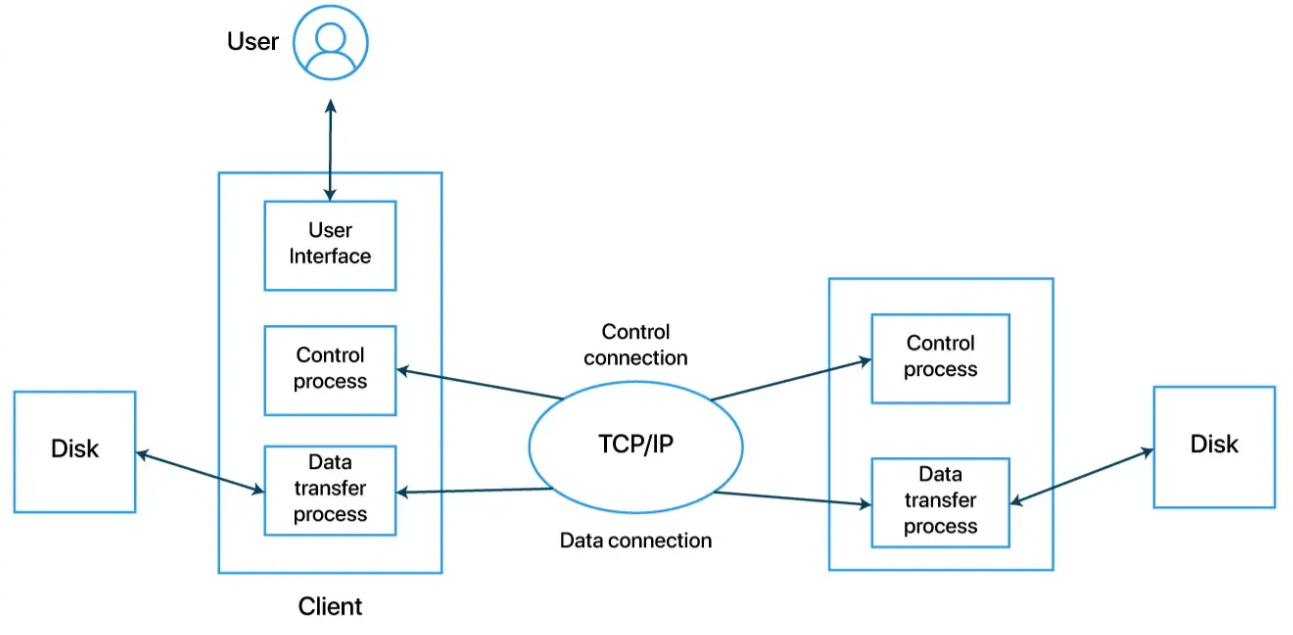
FTP uses two separate, simultaneous TCP connections:
- Command Channel (Port 21): Used for passing commands and replies (authentication, directory navigation).
- Data Channel (Port 20): Used exclusively for the actual transmission of file data.
FTP Client#
The user-facing software that initiates requests (e.g., FileZilla, WinSCP, or a command-line interface).
It Authenticates the user, maintains the command channel, and requests file transfers.
Components
- User Interface (UI): The application the human interacts with (e.g., FileZilla, WinSCP, or a command-line terminal).
- User Control Process (UCP): Translates UI actions into standard FTP commands and sends them over the control connection. It also listens for responses from the server.
- User Data Transfer Process (User DTP): Interacts with the local file system (Disk) to read or write file bytes during a transfer over the data connection.
FTP Server#
The backend system (daemon) that listens for incoming connection requests on specific ports.
It Authenticates clients, manages directory structures, and processes the file transfers requested by the client
Components
- Server Control Process (SCP): Listens on port 21 for incoming connection requests. It parses the commands sent by the client UCP, manages user access, and coordinates the server’s response.
- Server Data Transfer Process (Server DTP): Manages the data connection on the server side. It reads files from or writes files directly to the server storage drive.
Connection Modes#
The FTP data channel architecture operates in one of two modes:
- Active Mode: The client connects to the server’s command port (Port 21), but when transferring data, the server actively initiates the connection back to the client’s data port. (Often blocked by local client firewalls).
- Passive Mode (PASV): The client initiates both the command connection and the data connection. The server designates a random port for the data channel, making it firewall-friendly.
Commands#
When an FTP client communicates with a server over the control connection (Port 21), it sends short, 3-to-4-letter text commands. The server responds with a 3-digit status code followed by an explanatory text string.
Core FTP Commands:
Authentication & Connection#
USER <username>: Sends the user identification to the server. (First step of logging in).PASS <password>: Sends the user’s password immediately following theUSERcommand.QUIT: Terminates the control connection. If a data transfer is in progress, the server waits to close until the transfer finishes.
File & Directory Navigation#
PWD: Print Working Directory. Asks the server to return the current folder path.CWD <path>: Change Working Directory. Moves to a different folder on the server.CDUP: Change to Darent Directory. Moves up one level in the folder hierarchy.MKD <path>: Make Directory. Creates a new folder.RMD <path>: Remove Directory. Deletes an empty folder.
Connection Parameter Setup#
PORT <address>: Used in Active Mode. Tells the server which IP address and random port the client is listening on for the incoming data connection.PASV: Used in Passive Mode. Asks the server to open a dynamic data port and send back its IP and port number so the client can connect to it.TYPE <mode>: Sets the file transfer mechanism. Common values areAfor ASCII (plain text, which handles line-ending conversions) andIfor Image/Binary (raw bytes, used for images, zip files, and executables).
File Operations#
LIST: Requests a detailed list of files and subdirectories in the current folder. (Requires a data connection).RETR <filename>: Retrieve. Downloads a copy of the file from the server to the client.STOR <filename>: Store. Uploads a file from the client to the server.DELE <filename>: Deletes a specific file on the server.
Server Response Status Codes#
 [1xx] Positive Preliminary (Hold on, I'm starting...)
 [2xx] Positive Completion (Done! Success.)
 [3xx] Positive Intermediate (Got that, now give me the next step...)
 [4xx] Transient Negative Completion (Failed, but try again later.)
[5xx] Permanent Negative Completion (Fatal error, don't try again.)Modern Variations (Security Upgrades)#
Classic FTP sends credentials in cleartext. Modern architectures replace or wrap it for security:
- FTPS (FTP over SSL): Adds TLS/SSL encryption to the standard FTP architecture.
- FTPS usually uses port 990.
- FTPS requires a proper TLS certificate to run securely.
- SFTP (SSH File Transfer Protocol): A completely different architectural protocol based on the SSH framework that tunnels both commands and data through a single secure port (Port 22)
- If enabled in the OpenSSH server configuration, you can connect using a command such as
sftp username@hostname. - Once logged in, you can issue commands such as
get filenameandput filenameto download and upload files, respectively. Generally speaking, SFTP commands are Unix-like and can differ from FTP commands.
- If enabled in the OpenSSH server configuration, you can connect using a command such as