HTTP
HTTP#
HTTP (Hypertext Transfer Protocol) is a plain-text protocol used for communicating with a web server and retrieving information, this information could be things such as HTML pages, CSS, JavaScript, images etc.
- Developed by Tim Berners-Lee and his team between 1989-1991
- This protocol relies on TCP and defines how your web browser communicates with the web servers.
- The HTTP spec ↗
HTTPS (Hypertext Transfer Protocol Secure) is the secure, encrypted version of the standard HTTP protocol.
- It uses Transport Layer Security (TLS) to scramble data in transit, ensuring third parties cannot read it.
- HTTP and HTTPS commonly use TCP ports 80 and 443.
After resolving the domain name to an IP address, the client will carry out the following two steps:
- Establish a TCP three-way handshake with the target server
- Communicate using the HTTP protocol; for example, issue HTTP requests, such as
GET / HTTP/1.1
HTTP URL Structure#
URL : Uniform Resource Locator
http://user:password@example.com:80/fruits?id=1#apple
  |        |            |        |       |      |   |
scheme user Host/Domain port Path Query Fragment- Scheme: This is the portion of the URL that designates the underlying protocol to be used (for example, HTTP, FTP); it is followed by a colon and two forward slashes ( // ).
- User: Some services require authentication to log in, you can put a username and password into the URL to log in.
- Host: This is the IP address (numeric or DNS-based) for the web server being accessed; it usually follows the colon and two forward slashes.
- Port: This optional portion of the URL designates the port number to which the target web server listens. (The default port number for HTTP servers is 80, but some configurations are set up to use an alternate port number.)
- Path: This is the path from the “root” directory of the server to the desired resource. In this case, you can see that there is a directory called dir. (Keep in mind that, in reality, web servers may use aliasing to point to documents, gateways, and services that are not explicitly accessible from the server’s root directory.)
- Path-segment-params: This is the portion of the URL that includes optional name/value pairs (that is, path segment parameters). A path segment parameter is typically preceded by a semicolon (depending on the programming language used), and it comes immediately after the path information. Path segment parameters are not commonly used. In addition, it is worth mentioning that these parameters are different from query-string parameters (often referred to as URL parameters ).
- Query-string: This optional portion of the URL contains name/value pairs that represent dynamic parameters associated with the request. These parameters are commonly included in links for tracking and context-setting purposes. They may also be produced from variables in HTML forms. Typically, the query string is preceded by a question mark. Equals signs (=) separate names and values, and ampersands ( & ) mark the boundaries between name/value pairs.
- Fragment: This is a reference to a location on the actual page requested. This is commonly used for pages with long content and can have a certain part of the page directly linked to it, so it is viewable to the user as soon as they access the page. (eg: example.com/#heading1)
HTTP Messages#
HTTP messages are packets of data exchanged between a user (the client) and the web server.
There are two types of HTTP messages:
- HTTP Requests: Sent by the user to trigger actions on the web application.
- HTTP Responses: Sent by the server in response to the user’s request.
Each message follows a specific format that helps both the user and the server communicate smoothly.
- Start Line
The start line is like the introduction of the message. It tells you what kind of message is being sent—whether it’s a request from the user or a response from the server.- This line also gives important details about how the message should be handled.
- The first line in an http request is called the Request Line.
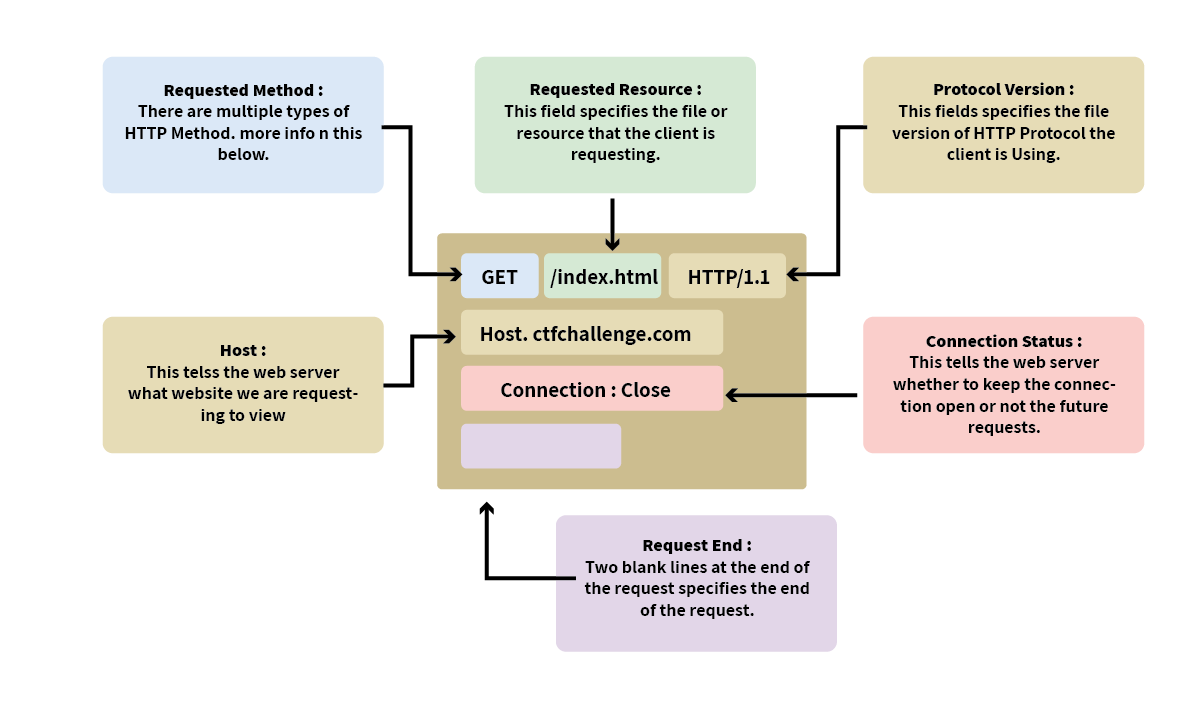
- It has three main parts: the HTTP method, the URL path, and the HTTP version. Example:
METHOD /path HTTP/version
- It has three main parts: the HTTP method, the URL path, and the HTTP version. Example:
- The first line in every HTTP response is called the Status Line. It gives you three key pieces of info:
- HTTP Version: This tells you which version of HTTP is being used.
- Status Code: A three-digit number showing the outcome of your request.
- Reason Phrase: A short message explaining the status code in human-readable terms.
- Headers
Headers are made up of key-value pairs that provide extra information about the HTTP message. They give instructions to both the client and the server handling the request or response. These headers cover all sorts of things, like security, content types, and more, making sure everything goes smoothly in the communication. - Empty Line
The empty line is a little divider that separates the header from the body. It’s essential because it shows where the headers stop and where the actual content of the message begins. Without this empty line, the message might get messed up, and the client or server could misinterpret it, causing errors. - Body
The body is where the actual data is stored. In a request, the body might include data the user wants to send to the server (like form data). In a response, it’s where the server puts the content that the user requested (like a webpage or API data).
Request Methods#
- GET: Retrieves information from the server
- HEAD: Basically the same as GET but returns only HTTP headers and no document body
- POST: Sends data to the server (typically using HTML forms, API requests, and so on)
- TRACE: Does a message loopback test along the path to the target resource
- PUT: Uploads a representation of the specified URI . This method is used to update content on a server.
- DELETE: Deletes the specified resource
- OPTIONS: Returns the HTTP methods that the server supports
- CONNECT: Converts the request connection to a transparent TCP/IP tunnel.
HTTP Version#
The HTTP version shows the protocol version used to communicate between the client and server. Here’s a quick rundown of the most common ones:
- HTTP/0.9 (1991): The first version, only supported GET requests.
- HTTP/1.0 (1996): Added headers and better support for different types of content, improving caching.
- HTTP/1.1 (1997): Brought persistent connections, chunked transfer encoding, and better caching. It’s still widely used today.
- HTTP/2 (2015): Introduced features like multiplexing, header compression, and prioritisation for faster performance.
- HTTP/3 (2022): Built on HTTP/2, but uses a new protocol (QUIC) for quicker and more secure connections.
Although HTTP/2 and HTTP/3 offer better speed and security, many systems still use HTTP/1.1 because it’s well-supported and works with most existing setups. However, upgrading to HTTP/2 or HTTP/3 can provide significant performance and security improvements as more systems adopt them.
Headers#
It’s possible to make a request to a web server with just one line GET / HTTP/1.1.
But for a much richer web experience, you’ll need to send other data as well. This other data is sent in what is called headers, where headers contain extra information to give to the web server you’re communicating with.
Request Headers
- Request Method
- The URI and the path-to-resource field: This represents the path portion of the requested URL.
- The request version-number field: This specifies the version of HTTP used by the client.
- Host: Some web servers host multiple websites so by providing the host headers you can tell it which one you require, otherwise you’ll just receive the default website for the server.
- The user agent: This is your browser software and version number, telling the web server your browser software helps it format the website properly for your browser and also some elements of HTML, JavaScript and CSS are only available in certain browsers.
- Content-Length: When sending data to a web server such as in a form, the content length tells the web server how much data to expect in the web request. This way the server can ensure it isn’t missing any data.
- Content Type: Describes what type or format of data is in the request.
- Accept-Encoding: Tells the web server what types of compression methods the browser supports so the data can be made smaller for transmitting over the internet.
- Cookie: Data sent to the server to help remember your information .
- Several other fields: accept, accept-language, accept encoding, and other fields also appear.
- HTTP requests always end with a blank line to inform the web server that the request has finished.
Response Headers
- Version of the HTTP protocol the server is using and then followed by the HTTP Status Code.
- Server: This tells us the web server software and version number.
- Date: The current date, time and timezone of the web server.
- Content-Type: tells the client what sort of information is going to be sent, such as HTML, images, videos, pdf, XML.
- Content-Length: tells the client how long the response is, this way we can confirm no data is missing.
- Content-Encoding: What method has been used to compress the data to make it smaller when sending it over the internet.
- Set-Cookie: Information to store which gets sent back to the web server on each request. Cookies can be set with the
HttpOnlyflag (so they can’t be accessed by JavaScript) and theSecureflag (so they’re only sent over HTTPS). - Cache-Control: How long to store the content of the response in the browser’s cache before it requests it again.
- Location: This one’s used in redirection (3xx) responses. It tells the client where to go next if the resource has moved. eg:
Location: /index.html
Request Body#
In HTTP requests such as POST and PUT, where data is sent to the web server as opposed to requested from the web server, the data is located inside the HTTP Request Body. The formatting of the data can take many forms, but some common ones are URL Encoded, Form Data, JSON, or XML.
- URL Encoded (application/x-www-form-urlencoded)
A format where data is structured in pairs of key and value where (key=value). Multiple pairs are separated by an (&) symbol, such askey1=value1&key2=value2. Special characters are percent-encoded. - Form Data (multipart/form-data)
Allows multiple data blocks to be sent where each block is separated by a boundary string. The boundary string is the defined header of the request itself. This type of formatting can be used to send binary data, such as when uploading files or images to a web server. - JSON (application/json)
In this format, the data can be sent using the JSON (JavaScript Object Notation) structure. Data is formatted in pairs of name : value. Multiple pairs are separated by commas, all contained within curly braces { }. - XML (application/xml)
In XML formatting, data is structured inside labels called tags, which have an opening and closing. These labels can be nested within each other.
Response Codes#
When a web server responds to a request it sends a 3 digit status code which lets the client know the result of the request.
1xx: Information Responses#
| Message: | Description: |
|---|---|
| 100 Continue | The server has received the request headers, and the client should proceed to send the request body |
| 101 Switching Protocols | The requester has asked the server to switch protocols |
| 103 Early Hints | Used with the Link header to allow the browser to start preloading resources while the server prepares a response |
2xx: Successful Responses#
| Message: | Description: |
|---|---|
| 200 OK | The request is OK (this is the standard response for successful HTTP requests) |
| 201 Created | The request has been fulfilled, and a new resource is created |
| 202 Accepted | The request has been accepted for processing, but the processing has not been completed |
| 203 Non-Authoritative Information | The request has been successfully processed, but is returning information that may be from another source |
| 204 No Content | The request has been successfully processed, but is not returning any content |
| 205 Reset Content | The request has been successfully processed, but is not returning any content, and requires that the requester reset the document view |
| 206 Partial Content | The server is delivering only part of the resource due to a range header sent by the client |
3xx: Redirection Responses#
| Message: | Description: |
|---|---|
| 300 Multiple Choices | A link list. The user can select a link and go to that location. Maximum five addresses |
| 301 Moved Permanently | The requested page has moved to a new URL |
| 302 Found | The requested page has moved temporarily to a new URL |
| 303 See Other | The requested page can be found under a different URL |
| 304 Not Modified | Indicates the requested page has not been modified since last requested |
| 307 Temporary Redirect | The requested page has moved temporarily to a new URL |
| 308 Permanent Redirect | The requested page has moved permanently to a new URL |
4xx: Client Error Responses#
| Message: | Description: |
|---|---|
| 400 Bad Request | The request cannot be fulfilled due to bad syntax |
| 401 Unauthorized | The request was a legal request, but the server is refusing to respond to it. For use when authentication is possible but has failed or not yet been provided |
| 402 Payment Required | Reserved for future use |
| 403 Forbidden | The request was a legal request, but the server is refusing to respond to it |
| 404 Not Found | The requested page could not be found but may be available again in the future |
| 405 Method Not Allowed | A request was made of a page using a request method not supported by that page |
| 406 Not Acceptable | The server can only generate a response that is not accepted by the client |
| 407 Proxy Authentication Required | The client must first authenticate itself with the proxy |
| 408 Request Timeout | The server timed out waiting for the request |
| 409 Conflict | The request could not be completed because of a conflict in the request |
| 410 Gone | The requested page is no longer available |
| 411 Length Required | The “Content-Length” is not defined. The server will not accept the request without it |
| 412 Precondition Failed | The precondition given in the request evaluated to false by the server |
| 413 Request Too Large | The server will not accept the request, because the request entity is too large |
| 414 Request-URI Too Long | The server will not accept the request, because the URI is too long. Occurs when you convert a POST request to a GET request with a long query information |
| 415 Unsupported Media Type | The server will not accept the request, because the media type is not supported |
| 416 Range Not Satisfiable | The client has asked for a portion of the file, but the server cannot supply that portion |
| 417 Expectation Failed | The server cannot meet the requirements of the Expect request-header field |
5xx: Server Error Responses#
| Message: | Description: |
|---|---|
| 500 Internal Server Error | A generic error message, given when no more specific message is suitable |
| 501 Not Implemented | The server either does not recognize the request method, or it lacks the ability to fulfill the request |
| 502 Bad Gateway | The server was acting as a gateway or proxy and received an invalid response from the upstream server |
| 503 Service Unavailable | The server is currently unavailable (overloaded or down) |
| 504 Gateway Timeout | The server was acting as a gateway or proxy and did not receive a timely response from the upstream server |
| 505 HTTP Version Not Supported | The server does not support the HTTP protocol version used in the request |
| 511 Network Authentication Required | The client needs to authenticate to gain network access |
Cookies#
Cookies are small piece of data that is stored on your computer.
- Cookies are saved when you receive a “Set-Cookie” header from a web server. Then every further request you make, you’ll send the cookie data back to the web server.
- Cookies can be used for many purposes but are most commonly used for website authentication. The cookie value won’t usually be a clear-text string where you can see the password, but a token (unique secret code that isn’t easily humanly guessable).
A REST API (or RESTful API) is a type of application programming interface (API) that conforms to the specification of the representational state transfer (REST) architectural style and allows for interaction with web services. REST APIs are used to build and integrate multiple-application software. In short, if you want to interact with a web service to retrieve information or add, delete, or modify data, an API helps you communicate with such a system in order to fulfill the request. REST APIs use JSON as the standard format for output and requests.
HTTPS#
HTTPS stands for Hypertext Transfer Protocol Secure. It is basically HTTP over TLS.
Consequently, requesting a page over HTTPS will require the following three steps (after resolving the domain name):
- Establish a TCP three-way handshake with the target server
- Establish a TLS session
- Communicate using the HTTP protocol; for example, issue HTTP requests, such as
GET / HTTP/1.1
TLS offered security for HTTP without requiring any changes in the lower or higher layer protocols. In other words, TCP and IP were not modified, while HTTP was sent over TLS the way it would be sent over TCP.
How HTTPS Works#
HTTPS is a layered architecture. It inserts the TLS protocol right in the middle of the OSI stack between TCP (Transport) and HTTP (Application).
┌─────────────────────────────────────────┐
│       HTTP (HTML, JSON, Headers)        │  <- Application Layer
├─────────────────────────────────────────┤
│       TLS (Encryption & Auth)           │  <- Cryptographic Layer
├─────────────────────────────────────────┤
│       TCP (Port 443 Streams)            │  <- Transport Layer
├─────────────────────────────────────────┤
│       IP (Routing Packets)              │  <- Network Layer
└─────────────────────────────────────────┘When a client connects to an HTTPS server, it executes two distinct sequential handshakes before any application data changes hands:
- The TCP Handshake (1 RTT): Standard Synchronize (
SYN), Synchronize-Acknowledgment (SYN-ACK), Acknowledgment (ACK) to stabilize the raw socket connection. - The TLS Handshake (1 RTT in TLS 1.3): The client and server agree on cryptographic algorithms, authenticate the server’s identity using an X.509 Digital Certificate, and compute symmetric session keys.
Once the handshakes terminate, all subsequent HTTP verbs (GET,POST), headers, status codes, and body assets are wrapped inside TLS application data packets.
Security Headers#
HTTP Security Headers help improve the overall security of the web application by providing mitigations against attacks like Cross-Site Scripting (XSS), clickjacking, and others.
- Content Security Policy (CSP)
- Strict-Transport-Security (HSTS)
- X-Content-Type-Options
- Referrer-Policy
You can use a site like https://securityheaders.io ↗ to analyse the security headers of any website.
HSTS#
The HSTS header ensures that web browsers will always connect over HTTPS.
example: Strict-Transport-Security: max-age=63072000; includeSubDomains; preload
Here’s a breakdown of the example HSTS header by directive:
- max-age
- This is the expiry time in seconds for this setting
- includeSubDomains
- An optional setting that instructs the browser to also apply this setting to all subdomains.
- preload
- This optional setting allows the website to be included in preload lists. Browsers can use preload lists to enforce HSTS before even having their first visit to a website.
X-Content-Type-Options#
The X-Content-Type-Options header can be used to instruct browsers not to guess the MIME type of a resource but only use the Content-Type header.
example: X-Content-Type-Options: nosniff
- nosniff
- This directive instructs the browser not to sniff or guess the MIME type.
Referrer-Policy#
This header controls the amount of information sent to the destination web server when a user is redirected from the source web server, such as when they click a hyperlink. The header is available to allow a web administrator to control what information is shared.
Here are some examples of Referrer-Policy:
Referrer-Policy: no-referrerReferrer-Policy: same-originReferrer-Policy: strict-originReferrer-Policy: strict-origin-when-cross-origin
Here’s a breakdown of the Referrer-Policy header by directives:
- no-referrer
- This completely disables any information being sent about the referrer
- same-origin
- This policy will only send referrer information when the destination is part of the same origin. This is helpful when you want referrer information passed when hyperlinks are within the same website but not outside to external websites.
- strict-origin
- This policy only sends the referrer as the origin when the protocol stays the same. So, a referrer is sent when an HTTPS connection goes to another HTTPS connection.
- strict-origin-when-cross-origin
- This is similar to strict-origin except for same-origin requests, where it sends the full URL path in the origin header.